qbds.fields().clearFieldList();
q.clearGroupBy();
qbds.addAllFields(tableId2Name(tablenum(SalesTarget)));

Showing posts with label AX 2009. Show all posts
Showing posts with label AX 2009. Show all posts

How to pull out some hidden reports in AX
Sometimes in different countries, you cannot find some specific reports.
ex: i cannot see Balance sheet or Ledger statement in VN
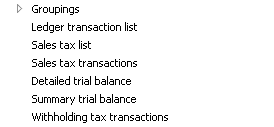
In CEU demo data:
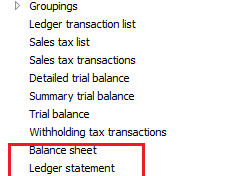
You will see the hidden report here.
Go properties and see it from Output > LedgerStatement
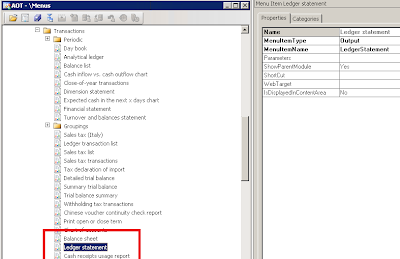
Go to Menu Items > Output > LedgerStatement > Go properties > add your company country code to CountryRegionCodes node ---> in this case i add VN
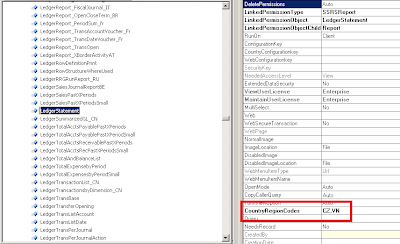
Save and open AX again, you'll see your report
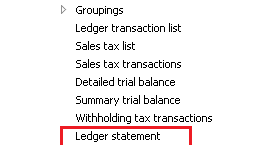
ex: i cannot see Balance sheet or Ledger statement in VN
In CEU demo data:
Follow these steps to pull out some hidden reports in AX:
Go to AOT > Menu > GL >Reports > Transactions You will see the hidden report here.
Go properties and see it from Output > LedgerStatement

Go to Menu Items > Output > LedgerStatement > Go properties > add your company country code to CountryRegionCodes node ---> in this case i add VN

Save and open AX again, you'll see your report
How to get query range value in Ctrl + G or standard filter on form in AX
After super() in excuteQuery() method in AX add this following code:
AX 2009:
info(YourDataSource_Ds.queryRun().query().dataSourceNo(1).toString());
AX 2012:
info(YourDataSource_Ds.queryRunQueryBuildDataSource().toString());
or
q = YourDataSource_Ds.queryRun().query();
for (i = 1; i <= q.queryFilterCount(); i++)
{
qf = q.queryFilter(i);
info(strFmt("%1: %2", qf.field(), qf.value()));
}
AX 2009:
info(YourDataSource_Ds.queryRun().query().dataSourceNo(1).toString());
AX 2012:
info(YourDataSource_Ds.queryRunQueryBuildDataSource().toString());
or
q = YourDataSource_Ds.queryRun().query();
for (i = 1; i <= q.queryFilterCount(); i++)
{
qf = q.queryFilter(i);
info(strFmt("%1: %2", qf.field(), qf.value()));
}
Sequence of methods in form and table in AX
Form:
Sequence of Methods calls while opening the Form
Form — init ()
Form — Datasource — init ()
Form — run ()
Form — Datasource — execute Query ()
Form — Datasource — active ()
Sequence of Methods calls while closing the Form
Form — canClose ()
Form — close ()
Sequence of Methods calls while creating the record in the Form
Form — Datasource — create ()
Form — Datasource — initValue ()
Table — initValue ()
Form — Datasource — active ()
Sequence of Method calls while saving the record in the Form
Form — Datasource — ValidateWrite ()
Table — ValidateWrite ()
Form — Datasource — write ()
Table — insert ()
Sequence of Method calls while deleting the record in the Form
Form — Datasource — validatedelete ()
Table — validatedelete ()
Table — delete ()
Form — Datasource — active ()
Sequence of Methods calls while modifying the fields in the Form
Table — validateField ()
Table — modifiedField ()
Table:
When you press CTR+NinitValue()->
When you change data in a field
validateField() -> validateFieldValue() -> ModifiedField() -> ModifiedFieldValue()
When you close the table after entering some data
validateWrite() – > Insert() -> aosValidateInsert()
When you Save the Record for the first time
validateWrite() ->Insert() – > aosValidateInsert()
When you modify the record and saving
validateWrite() -> update() – > aosValidateUpdate()
When you delete the record
validateDelete() -> delete() -> aosValidateDelete()
Convert row, column to Excel range in Axapta
This method is show how to convert row and column to Excel range:
rowfrom = 1,
colfrom = 1,
rowto = 5,
colto = 5;
>> A1:E5
public str convertToRange(int rowfrom, int colfrom, int rowto = 0,int colto = 0)
{
str strrange, srange1;
;
if(rowfrom <= 0 || colfrom <= 0)
{
throw warning("We don`t have row <=0 or column <=0 in Excel");
}
if(rowto != 0 && colto != 0)
{
if(rowto <= 0 || colto <= 0)
{
throw warning("We don`t have row <=0 or column <=0 in Excel");
}
if(colto <= 26)
{
strrange = num2char(colto+64) + int2str(rowto);
}
else
{
strrange = num2char((colto-1)/26+64)+num2char(((colto-1)mod 26)+65) + int2str(rowto);
}
}
if(colfrom <= 26)
{
srange1 = num2char(colfrom+64) + int2str(rowfrom);
}
else
{
srange1=num2char((colfrom-1)/26+64)+num2char(((colfrom-1)mod 26)+65) + int2str(rowfrom);
}
if(rowto != 0 && colto != 0)
{
return srange1 + ":" + strrange;
}
else return srange1;
}
rowfrom = 1,
colfrom = 1,
rowto = 5,
colto = 5;
>> A1:E5
public str convertToRange(int rowfrom, int colfrom, int rowto = 0,int colto = 0)
{
str strrange, srange1;
;
if(rowfrom <= 0 || colfrom <= 0)
{
throw warning("We don`t have row <=0 or column <=0 in Excel");
}
if(rowto != 0 && colto != 0)
{
if(rowto <= 0 || colto <= 0)
{
throw warning("We don`t have row <=0 or column <=0 in Excel");
}
if(colto <= 26)
{
strrange = num2char(colto+64) + int2str(rowto);
}
else
{
strrange = num2char((colto-1)/26+64)+num2char(((colto-1)mod 26)+65) + int2str(rowto);
}
}
if(colfrom <= 26)
{
srange1 = num2char(colfrom+64) + int2str(rowfrom);
}
else
{
srange1=num2char((colfrom-1)/26+64)+num2char(((colfrom-1)mod 26)+65) + int2str(rowfrom);
}
if(rowto != 0 && colto != 0)
{
return srange1 + ":" + strrange;
}
else return srange1;
}
Subscribe to:
Posts (Atom)