qbds.fields().clearFieldList();
q.clearGroupBy();
qbds.addAllFields(tableId2Name(tablenum(SalesTarget)));

Showing posts with label AX 2012. Show all posts
Showing posts with label AX 2012. Show all posts

How to add multiple report design under Print management in AX 2012
If you have new formats for Sales/Purchase/Quotation confirmation/Picking/Packing/Invoice..., following these steps :
Step1. Create new Design for report under visual studio
Step2. Add code to method:
\Data Dictionary\Tables\PrintMgmtReportFormat\Methods\populate
\Data Dictionary\Tables\PrintMgmtReportFormat\Methods\populate
Add code before TTSCOMMIT:
addOther(PrintMgmtDocumentType::SalesOrderPackingSlip, ssrsReportStr(SalesPackingSlip, ReportUD), ssrsReportStr(SalesPackingSlip, ReportUD), #NoCountryRegionId);
Step 3. Choose you new format under:
AR -> setup -> form setup -> Print management -> Sales order Packing slip original -> report format to SalesPackingslip.ReportUD
Step 4.
New Report design can be executed from use Print management from Inquiry journal forms or during posting by selecting Print management destination.
Step 5. (Optional)
In case: the report still keep original design, add this code to class TradeDocumentReportController in method outputReport:
//original menu item or your new menu item
if(args.menuItemName() == menuitemOutputStr(SalesPackingSlipOriginal))
{
formLetterReport.getCurrentPrintSetting().parmReportFormatName(ssrsReportStr(SalesPackingSlipOriginal, ReportUD));
}
AxBuild in AX 2012 CU7 perform faster full compile and fix error from AxBuild
AxBuild.exe can accomplish a full compile of all X++ code, into AX p-code, many times faster than the traditional compile that you start from the MorphX client menu.AxBuild.exe is run on the Application Object Server (AOS) tier at a cmd.exe command prompt.
AxBuild.exe became available in cumulative update 7 for Microsoft Dynamics AX 2012 R2.
enter: Cmd >> go to specified path C:\Program Files\Microsoft Dynamics AX\60\Server\MicrosoftDynamicsAX\bin
enter: axbuild xppcompileall /s=01
or
axbuild xppcompileall /s=01 /log="E:\log" /altbin="C:\Program Files (x86)\Microsoft Dynamics AX\60\Client\Bin" /compiler="C:\Program Files\Microsoft Dynamics AX\60\Server\AX2012R2\bin\ax32serv.exe"

Result: total time 1 hour 3 mins

Fix error from AxBuild:
*** After compiling with AXBuild, maybe you tried to do a full CIL Generation. This always results in the following error code 351: System.ArgumentOutOfRangeException: Index was out of range. Must be non-negative and less than the size of the collection.
Go to "C:\Program Files\Microsoft Dynamics AX\60\Server\MicrosoftDynamicsAX\Log" (or the path you defined in command)
Open AxCompileAll.html you will see all the error here, go to class or form from error list... compile them manually.
Do full comile CIL again
AxBuild.exe became available in cumulative update 7 for Microsoft Dynamics AX 2012 R2.
enter: Cmd >> go to specified path C:\Program Files\Microsoft Dynamics AX\60\Server\MicrosoftDynamicsAX\bin
enter: axbuild xppcompileall /s=01
or
axbuild xppcompileall /s=01 /log="E:\log" /altbin="C:\Program Files (x86)\Microsoft Dynamics AX\60\Client\Bin" /compiler="C:\Program Files\Microsoft Dynamics AX\60\Server\AX2012R2\bin\ax32serv.exe"
Result: total time 1 hour 3 mins
Fix error from AxBuild:
*** After compiling with AXBuild, maybe you tried to do a full CIL Generation. This always results in the following error code 351: System.ArgumentOutOfRangeException: Index was out of range. Must be non-negative and less than the size of the collection.
Go to "C:\Program Files\Microsoft Dynamics AX\60\Server\MicrosoftDynamicsAX\Log" (or the path you defined in command)
Open AxCompileAll.html you will see all the error here, go to class or form from error list... compile them manually.
Do full comile CIL again
How to entering Sales Lines by bar code in AX 2012
In AX 2012, we only choose bar code after we have item id on sales line.

This is a simple code to show you how to chose bar code and auto bring item id and product dimension to sales lines:
Comment this code in class SalesTableForm method adjustLineAccessBasedOnItem

Comment this code in Form SalesTable method setReturnFields

Overide method modified of BarCode field in SalesLine datasource

This is a simple code to show you how to chose bar code and auto bring item id and product dimension to sales lines:
Comment this code in class SalesTableForm method adjustLineAccessBasedOnItem
Comment this code in Form SalesTable method setReturnFields
Overide method modified of BarCode field in SalesLine datasource
Steps to repeat table headers in SSRS AX 2012
1. Select a drop-down arrow beside column groups and enable "Advanced Mode" by clicking on it.

2. Then under Row Groups, select the static row and choose properties or press F4.
3. Set the following attributes for the static header row:
RepeatOnNewPage : True
KeepWithGroup: None

2. Then under Row Groups, select the static row and choose properties or press F4.
3. Set the following attributes for the static header row:
RepeatOnNewPage : True
KeepWithGroup: None
Fix some errors from: CIL generation, Database Synchronize in AX 2012
1.) "A parameter could not be serialized":
For a quick resolve: uncheck option "Excute business operations in CIL" under Tools-> Options -> Development tab.

The reason is that you haven't been able to do a successful FULL CIL compile.
Run again and try to fix the error in CIL.
2.)"CIL generation: source array was not long enough...":
1. Stop the AOS.
2. Delete all of the source in the C:\Program Files\Microsoft Dynamics AX\60\Server\MicrosoftDynamicsAX\bin\XppIL directory.
3. Start the AOS.
4. Perform a full CIL generation.
5.(Only do if errors are still there and you have no error when compile X++, just comment the code notice in Compiler output with /*..*/, recompile CIL and delete comment tag)
3.) "CIL generation error : The given key was not present in the dictionary":
1. Check the CIL log file, generally located at "C:\Program Files\Microsoft Dynamics AX\60\Server\MicrosoftDynamicsAX\bin\XppIL\Dynamics.Ax.Application.dll.log"
2. You will find the AOT object for which the CIL generator found the error.
3. Compile that object, fix the error, or delete (if needed) and then regenerate the IL.
4. (Only do if errors are still there : Stop AOS > Delete the .auc file from users\\Appdata folder > Restart AOS)
4.) DB synchronize error: "Field mismatch in union query. Field ... is not compatible with field ..."
Check your EDT concern to that field ( in query, table, view). They have different size.
So you just change the size to be the same.
Or check someone changed size of standard EDT. It's the reason cause this error
2. Truncate the SysXPPAssembly in db model
C:\Program Files\Microsoft Dynamics AX\60\Server\MicrosoftDynamicsAX\bin\XppIL
For a quick resolve: uncheck option "Excute business operations in CIL" under Tools-> Options -> Development tab.

The reason is that you haven't been able to do a successful FULL CIL compile.
Run again and try to fix the error in CIL.
2.)"CIL generation: source array was not long enough...":
1. Stop the AOS.
2. Delete all of the source in the C:\Program Files\Microsoft Dynamics AX\60\Server\MicrosoftDynamicsAX\bin\XppIL directory.
3. Start the AOS.
4. Perform a full CIL generation.
5.(Only do if errors are still there and you have no error when compile X++, just comment the code notice in Compiler output with /*..*/, recompile CIL and delete comment tag)
3.) "CIL generation error : The given key was not present in the dictionary":
1. Check the CIL log file, generally located at "C:\Program Files\Microsoft Dynamics AX\60\Server\MicrosoftDynamicsAX\bin\XppIL\Dynamics.Ax.Application.dll.log"
2. You will find the AOT object for which the CIL generator found the error.
3. Compile that object, fix the error, or delete (if needed) and then regenerate the IL.
4. (Only do if errors are still there : Stop AOS > Delete the .auc file from users\\Appdata folder > Restart AOS)
4.) DB synchronize error: "Field mismatch in union query. Field ... is not compatible with field ..."
Check your EDT concern to that field ( in query, table, view). They have different size.
So you just change the size to be the same.
Or check someone changed size of standard EDT. It's the reason cause this error
5.) "Duplicate type with name 'Dynamics.Ax.application.' in
assembly 'Dynamics.Ax.application "
1. Stop the ax service.
2. Truncate the SysXPPAssembly in db model
3. Delete all the files in below directory in server where AOS hosted:
4. Start the service
5. Compile full CIL
Look up dimension value by dimension attribute name in AX 2012
public static
void
lookupDimensionValueByAttribute(FormStringControl _formControl, Name
_dimensionAttributeName)
{
Args args;
FormRun
lookupFormRun;
DimensionAttribute dimAttr;
Object object;
if (_formControl != null)
{
//
Construct arguments for the custom lookup
args = new
Args();
args.name(formStr(DimensionDefaultingLookup));
args.lookupValue(_formControl.text());
args.caller(_formControl);
// Find
the dimension attribute associated with the string control which called this
method
dimAttr =
DimensionAttribute::findByLocalizedName(_dimensionAttributeName);
args.lookupField(dimAttr.ValueAttribute);
args.record(dimAttr);
// Run the
custom lookup and init the lookup form
lookupFormRun =
classfactory.formRunClass(args);
lookupFormRun.init();
// Specify
this is the callback on the lookup form by casting the
// form to
an object and late binding the setResultCallback method
if
(SysFormRun::hasMethod(lookupFormRun, identifierStr(setResultCallback)))
{
object = lookupFormRun;
object.setResultCallback();
}
_formControl.performFormLookup(lookupFormRun);
}
}
How to get ledger dimension values for active account structure in AX 2012
These are the jobs for getting ledger dimension values for active account structure in AX 2012
1*
static void
getDimensionCombinationValues(Args _args)
{
DimensionAttributeLevelValueAllView
dimensionAttributeLevelValueAllView;
DimensionAttribute dimensionAttribute;
Set
dimensionAttributeProcessed;
LedgerDimensionAccount _ledgerDimension;
str segmentName,
segmentDescription;
SysDim segmentValue;
str
getDynamicAccountAttributeName(TableNameShort _dimensionAttrViewName)
{
#Dimensions
container
cachedResult;
SysModelElement modelElement;
SysDictTable sysDictTable;
DictView dictView;
Label label;
Debug::assert(_dimensionAttrViewName like #DimensionEnabledPrefixWithWildcard);
//
Get/cache results of the AOT metadata lookup on the view
cachedResult =
DimensionCache::getValue(DimensionCacheScope::DynamicAccountAttributeName,
[_dimensionAttrViewName]);
if
(cachedResult == conNull())
{
//
Find the matching model element and instantiate the AOT metadata definition of
the view
select
firstOnly AxId, Name from modelElement
where modelElement.ElementType ==
UtilElementType::Table
&&
modelElement.Name == _dimensionAttrViewName;
sysDictTable = new sysDictTable(modelElement.AxId);
Debug::assert(sysDictTable.isView());
//
Create an instance of the view and get the singular representation of the
entity name as a label ID (do not translate)
dictView = new dictView(modelElement.AxId);
cachedResult =
[dictView.singularLabel()];
DimensionCache::insertValue(DimensionCacheScope::DynamicAccountAttributeName,
[_dimensionAttrViewName], cachedResult);
}
label = new
label();
return
label.extractString(conPeek(cachedResult,
1));
}
_ledgerDimension = 22565435768;
if
(_ledgerDimension)
{
dimensionAttributeProcessed = new Set(extendedTypeId2Type(extendedTypeNum(DimensionAttributeRecId)));
while
select DisplayValue,
AttributeValueRecId from
dimensionAttributeLevelValueAllView
order
by
dimensionAttributeLevelValueAllView.GroupOrdinal,
dimensionAttributeLevelValueAllView.ValueOrdinal
where
dimensionAttributeLevelValueAllView.ValueCombinationRecId == _ledgerDimension
join
Name, Type, ViewName, RecId from
dimensionAttribute
where
dimensionAttribute.RecId ==
dimensionAttributeLevelValueAllView.DimensionAttribute
{
if
(!dimensionAttributeProcessed.in(dimensionAttribute.RecId))
{
if
(DimensionAttributeType::DynamicAccount == dimensionAttribute.Type)
{
//
Use the singular name of the view backing the multi-typed entity
segmentName =
getDynamicAccountAttributeName(dimensionAttribute.ViewName);
}
else
{
//
Use the name of the attribute directly for all other types (main account,
custom list, existing list)
segmentName =
dimensionAttribute.localizedName();
}
segmentValue =
dimensionAttributeLevelValueAllView.DisplayValue;
segmentDescription =
DimensionAttributeValue::find(
dimensionAttributeLevelValueAllView.AttributeValueRecId).getName();
dimensionAttributeProcessed.add(dimensionAttribute.RecId);
info(strFmt("%1: %2, %3",
segmentName, segmentValue, segmentDescription));
}
}
}
}
2*
static void
getActiveDimensionCombinationValues(Args _args)
{
//
DimensionAttributeValueCombination stores the combinations of dimension values
// Any tables
that uses dimension combinations for
main account and dimensions
// Has a
reference to this table’s recid
DimensionAttributeValueCombination dimAttrValueCombination;
// Class
Dimension storage is used to store and manipulate the values of combination
DimensionStorage dimensionStorage;
// Class
DimensionStorageSegment will get specfic segments based on hierarchies
DimensionStorageSegment segment;
int segmentCount,
segmentIndex;
int hierarchyCount,
hierarchyIndex;
str segmentName,
segmentDescription;
SysDim segmentValue;
DimensionHierarchy dimensionHierarchy;
LedgerDimensionAccount ledgerDimension;
;
ledgerDimension = 22565435768;
setPrefix("Dimension values");
//Fetch the
Value combination record
dimAttrValueCombination =
DimensionAttributeValueCombination::find(ledgerDimension);
setPrefix("Breakup for " +
dimAttrValueCombination.DisplayValue);
// Get
dimension storage
dimensionStorage =
DimensionStorage::findById(ledgerDimension,true);
if
(dimensionStorage == null)
{
throw
error("@SYS83964");
}
dimensionHierarchy =
DimensionStorage::getAccountStructureFromLedgerDimension(ledgerDimension);
// Get hierarchy
count
hierarchyCount =
dimensionStorage.hierarchyCount();
//Loop through
hierarchies to get individual segments
for(hierarchyIndex
= 1; hierarchyIndex <= hierarchyCount;
hierarchyIndex++)
{
//get
segment value for active account structure
if(
dimensionHierarchy.RecId ==
DimensionHierarchy::find(dimensionStorage.getHierarchyId(hierarchyIndex)).RecId)
{
setPrefix(strFmt("Hierarchy:
%1", dimensionHierarchy.Name));
//Get
segment count for hierarchy
segmentCount =
dimensionStorage.segmentCountForHierarchy(hierarchyIndex);
//Loop
through segments and display required values
for
(segmentIndex = 1; segmentIndex <=
segmentCount; segmentIndex++)
{
// Get
segment
segment =
dimensionStorage.getSegmentForHierarchy(hierarchyIndex, segmentIndex);
//
Get the segment information
if
(segment.parmDimensionAttributeValueId() != 0)
{
//
Get segment name
segmentName =
DimensionAttribute::find(DimensionAttributeValue::find(segment.parmDimensionAttributeValueId()).DimensionAttribute).Name;
//Get
segment value (id of the dimension)
segmentValue = segment.parmDisplayValue();
//Get
segment value name (Description for dimension)
segmentDescription = segment.getName();
info(strFmt("%1:
%2, %3", segmentName, segmentValue, segmentDescription));
}
}
}
}
}
How to utilize Correspondence, function of Russia in AX 2012 for different countrys (Resolving problem with many–to–many transactions in AX 2012)
What is Correspondence?
Correspondence of accounts is an approach to continuous and
interrelated registration of business transactions in corresponding general
ledger accounts, based on the double-entry bookkeeping system. Ledger vouchers
are represented by using the Russian accounting standards with corresponding
accounts.
http://technet.microsoft.com/EN-US/library/jj923566.aspx
http://technet.microsoft.com/en-us/library/jj665271.aspx
http://technet.microsoft.com/en-us/library/jj733174.aspx
http://technet.microsoft.com/en-us/library/jj711560.aspx
http://technet.microsoft.com/en-us/library/jj665271.aspx
http://technet.microsoft.com/en-us/library/jj733174.aspx
http://technet.microsoft.com/en-us/library/jj711560.aspx

1. Allow using Correspondence on GL parameter

How to active >> Add your country ISO code to extended data type LedgerBondUseCorrespondence_RU

2. Active Manual Correspondence : GL > Periodic > Manual correspondence

How to active >> Add your country ISO code >> follow
path in below pic

3. Do the same for base enum LedgerBondShowMode_RU
4. Modify project RU_GL_Correspondence and class SysCountryRegionCode to make your country Region is legal for these function
5. Do a many-to-many journal in GL for testing
6. Have a look on GL > GL > Periodic > Manual
correspondence

******* These are just a few simple steps to make it display and reference.
If you want to make this function working without using country code RUS, you have to work
more customization on project RU_GL_Correspondence or contact me for a solution
Fix error "Invalid name. The application object ... already exists" in AX 2012
Fix error "Invalid name. The application object ... already exists" in AX 2012

How to pull out some hidden reports in AX
Sometimes in different countries, you cannot find some specific reports.
ex: i cannot see Balance sheet or Ledger statement in VN
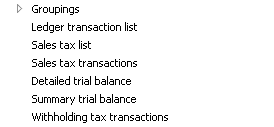
In CEU demo data:
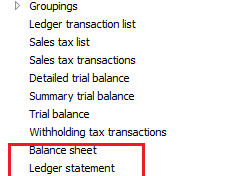
You will see the hidden report here.
Go properties and see it from Output > LedgerStatement
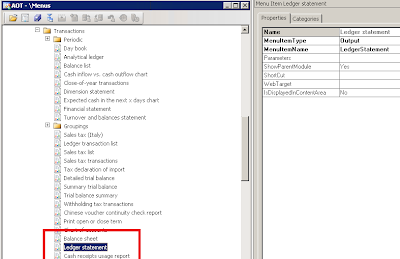
Go to Menu Items > Output > LedgerStatement > Go properties > add your company country code to CountryRegionCodes node ---> in this case i add VN
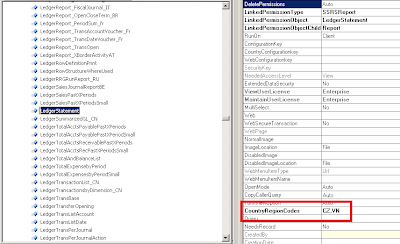
Save and open AX again, you'll see your report
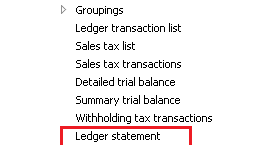
ex: i cannot see Balance sheet or Ledger statement in VN
In CEU demo data:
Follow these steps to pull out some hidden reports in AX:
Go to AOT > Menu > GL >Reports > Transactions You will see the hidden report here.
Go properties and see it from Output > LedgerStatement

Go to Menu Items > Output > LedgerStatement > Go properties > add your company country code to CountryRegionCodes node ---> in this case i add VN

Save and open AX again, you'll see your report
How to get query range value in Ctrl + G or standard filter on form in AX
After super() in excuteQuery() method in AX add this following code:
AX 2009:
info(YourDataSource_Ds.queryRun().query().dataSourceNo(1).toString());
AX 2012:
info(YourDataSource_Ds.queryRunQueryBuildDataSource().toString());
or
q = YourDataSource_Ds.queryRun().query();
for (i = 1; i <= q.queryFilterCount(); i++)
{
qf = q.queryFilter(i);
info(strFmt("%1: %2", qf.field(), qf.value()));
}
AX 2009:
info(YourDataSource_Ds.queryRun().query().dataSourceNo(1).toString());
AX 2012:
info(YourDataSource_Ds.queryRunQueryBuildDataSource().toString());
or
q = YourDataSource_Ds.queryRun().query();
for (i = 1; i <= q.queryFilterCount(); i++)
{
qf = q.queryFilter(i);
info(strFmt("%1: %2", qf.field(), qf.value()));
}
How to make Relation in Extended Data Type and add 'View Details' for field on a form in AX 2012
Because AX 2012 is not support for add relation to Extended Data Type like in AX 2009.
This is my solution how to do it in 2012:
- Duplicate an EDT have relation in AX 2012: ex SalesId and change name. relation table, reference table to yours -> you have an EDT with relation

**** If your project have been customized already and have a lot tables with field extend from your EDT, you don't need to change EDT property in each table (because it takes lot of time). Follow these steps:
- Export your Proj xpo (with old EDT too)
- Delete old EDT, rename duplicated EDT to your EDT ( now tables with fields extended by your EDT lost all EDT property)

- Import project without old EDT ( auto fill property for all extend field)

The filed with EDT have relation auto add 'View Details function on form (Right-click a field in a form, and then click View details)
***1 more way to add 'View Details' with field not extend from EDT
Open the form in the AOT, expand its data sources, and override jumpRef() of the field on the your datasource with the following code:
public void jumpRef()
{
YourTable name;
Args args;
MenuFunction mf;
name = YourTable ::find(YourTable.fieldId);
if (!name)
{
return;
}
args = new Args();
args.caller(element);
args.record(name);
mf = new MenuFunction(menuitemDisplayStr(YourForm),MenuItemType::Display);
mf.run(args);
}

This is my solution how to do it in 2012:
- Duplicate an EDT have relation in AX 2012: ex SalesId and change name. relation table, reference table to yours -> you have an EDT with relation

**** If your project have been customized already and have a lot tables with field extend from your EDT, you don't need to change EDT property in each table (because it takes lot of time). Follow these steps:
- Export your Proj xpo (with old EDT too)
- Delete old EDT, rename duplicated EDT to your EDT ( now tables with fields extended by your EDT lost all EDT property)

- Import project without old EDT ( auto fill property for all extend field)

***1 more way to add 'View Details' with field not extend from EDT
Open the form in the AOT, expand its data sources, and override jumpRef() of the field on the your datasource with the following code:
public void jumpRef()
{
YourTable name;
Args args;
MenuFunction mf;
name = YourTable ::find(YourTable.fieldId);
if (!name)
{
return;
}
args = new Args();
args.caller(element);
args.record(name);
mf = new MenuFunction(menuitemDisplayStr(YourForm),MenuItemType::Display);
mf.run(args);
}
Database entity relationship diagrams for tables of Microsoft Dynamics AX 2012 R2.
Check it out here: http://www.microsoft.com/dynamics/ax/erd/ax2012r2/
Ex: ERD: Centered on table 'GeneralJournalAccountEntry'

Ex: ERD: Centered on table 'GeneralJournalAccountEntry'

Sequence of methods in form and table in AX
Form:
Sequence of Methods calls while opening the Form
Form — init ()
Form — Datasource — init ()
Form — run ()
Form — Datasource — execute Query ()
Form — Datasource — active ()
Sequence of Methods calls while closing the Form
Form — canClose ()
Form — close ()
Sequence of Methods calls while creating the record in the Form
Form — Datasource — create ()
Form — Datasource — initValue ()
Table — initValue ()
Form — Datasource — active ()
Sequence of Method calls while saving the record in the Form
Form — Datasource — ValidateWrite ()
Table — ValidateWrite ()
Form — Datasource — write ()
Table — insert ()
Sequence of Method calls while deleting the record in the Form
Form — Datasource — validatedelete ()
Table — validatedelete ()
Table — delete ()
Form — Datasource — active ()
Sequence of Methods calls while modifying the fields in the Form
Table — validateField ()
Table — modifiedField ()
Table:
When you press CTR+NinitValue()->
When you change data in a field
validateField() -> validateFieldValue() -> ModifiedField() -> ModifiedFieldValue()
When you close the table after entering some data
validateWrite() – > Insert() -> aosValidateInsert()
When you Save the Record for the first time
validateWrite() ->Insert() – > aosValidateInsert()
When you modify the record and saving
validateWrite() -> update() – > aosValidateUpdate()
When you delete the record
validateDelete() -> delete() -> aosValidateDelete()
Subscribe to:
Comments (Atom)